Why fixed spaces stop working with hybrid work
A fixed space makes sense when its owner comes to the office every day. If they come three days a week, the space is empty 40 % of working time, and that is before holidays, trips and sick leave. Meanwhile, other colleagues circle the car park looking for a spot or park outside.
The problem has two sides:
- Empty spaces nobody can use, because they «belong to» someone who is working from home today.
- Demand peaks that do saturate the car park, because with hybrid work people tend to come in on the same days (for example, Tuesday and Wednesday).
The chart sums it up: with 20 people who come to the office three days a week, the busiest day needs 16 spaces, not 20, and Friday only 4. What determines how many spaces you need is the peak day, not the average or the number of employees.
The data you need before allocating
Five numbers let you size the car park and decide with evidence, without opinion-based arguments:
- How many spaces you have in total and of what type (standard, electric, accessible, outdoor).
- How many people are entitled to use them.
- How many days a week each person comes to the office.
- Which day of the week is busiest (the peak).
- What percentage comes by car. The rest use public transport, cycle or walk.
An example with figures you can replace with your own: a company of 200 people on a three-days-in-the-office model has about 120 people in on an average day, but on Tuesday and Wednesday it can reach 160. If 60 % come by car, the peak day needs 160 × 0.6 = 96 spaces. With a 10 % margin for the unexpected, that is around 105.
If instead you give a fixed space to everyone who comes by car (200 × 0.6), you need 120 spaces. Sharing saves about 15 spaces, 12 % fewer. These are indicative figures: the real saving depends on how much people overlap and what share is fixed.
Five models for assigning spaces
| Model | How it works | When it fits | Risk |
|---|---|---|---|
| Fixed space per person | Each person has their own every day. | An office-based workforce, or a car park with plenty of room. | Empty spaces when the owner is not in. |
| Space assigned by day | The same space goes to one person on some days and to another on others. | Teams with a stable office schedule (team A Monday and Tuesday, team B Thursday and Friday). | Falls apart if office days change. |
| First come, first served | No booking: whoever arrives first parks. | Car parks with far more spaces than demand. | Morning queues, rushing and arriving early to secure a spot. |
| Daily booking | A specific space is booked a few days ahead. | High demand and hybrid work. | Needs a tool, and unused bookings must be cancelled. |
| Mixed model | A few fixed spaces on clear criteria, and the rest on daily booking. | Most mid-sized companies with hybrid work. | You have to define and defend the criteria for fixed spaces. |
The mixed model best balances fairness and use of space. As a guide, many companies start by keeping 10 to 20 % of spaces as fixed and sharing the rest. Adjust the figure with the data from your own car park.
Criteria for fixed spaces: how to decide without grievances
The hard part of the mixed model is deciding who gets a fixed space. What prevents conflict is not the specific criterion but that it is public, written down and reviewable. Some common criteria:
- Reduced mobility or medical needs. It is the clearest criterion and the least disputed.
- Service or fleet vehicles that need a specific spot.
- Visitors and clients. A few spaces reserved for guests stop employees taking them.
- No transport alternative, or shifts that start or finish when there is no public service.
- Specific roles, such as management, if the company decides to keep that. If you do, make it explicit.
Review the list every six months: circumstances change, and a fixed space that is no longer justified should go back into the shared pool.
Rules to make daily booking work
- Booking window. How many days ahead people can book (for example, 3 to 7). A short window stops anyone grabbing the whole week.
- Cancel in time. Ask people to cancel a booking as soon as they know they will not use it. A freed space is a space for someone else.
- A limit on days per person when spaces are scarce, to share fairly on peak days.
- Reasoned, documented priorities, for example for people with reduced mobility.
- A channel to report issues: a stuck barrier, a car in someone else's space or a damaged space. Define who responds.
- Rules visible to everyone. Publish them where people will see them, not just in an email that gets lost.
A rule that cannot be checked will not be followed. A calendar where everyone can see which spaces are free and which are booked does far more than any reminder email.
How to do it with LoomiSpot
LoomiSpot is office parking management software. This is what it covers of the mixed model:
- Assignment to a person on specific days for fixed spaces, and first come, first served for the rest.
- You decide the booking window: how many days ahead a space can be booked.
- A monthly calendar heatmap showing how many spaces are booked and how many are free each day, which gives you the peak-day figure.
- Multiple offices, each with its own spaces and weekly schedule (which days it is open, weekends included).
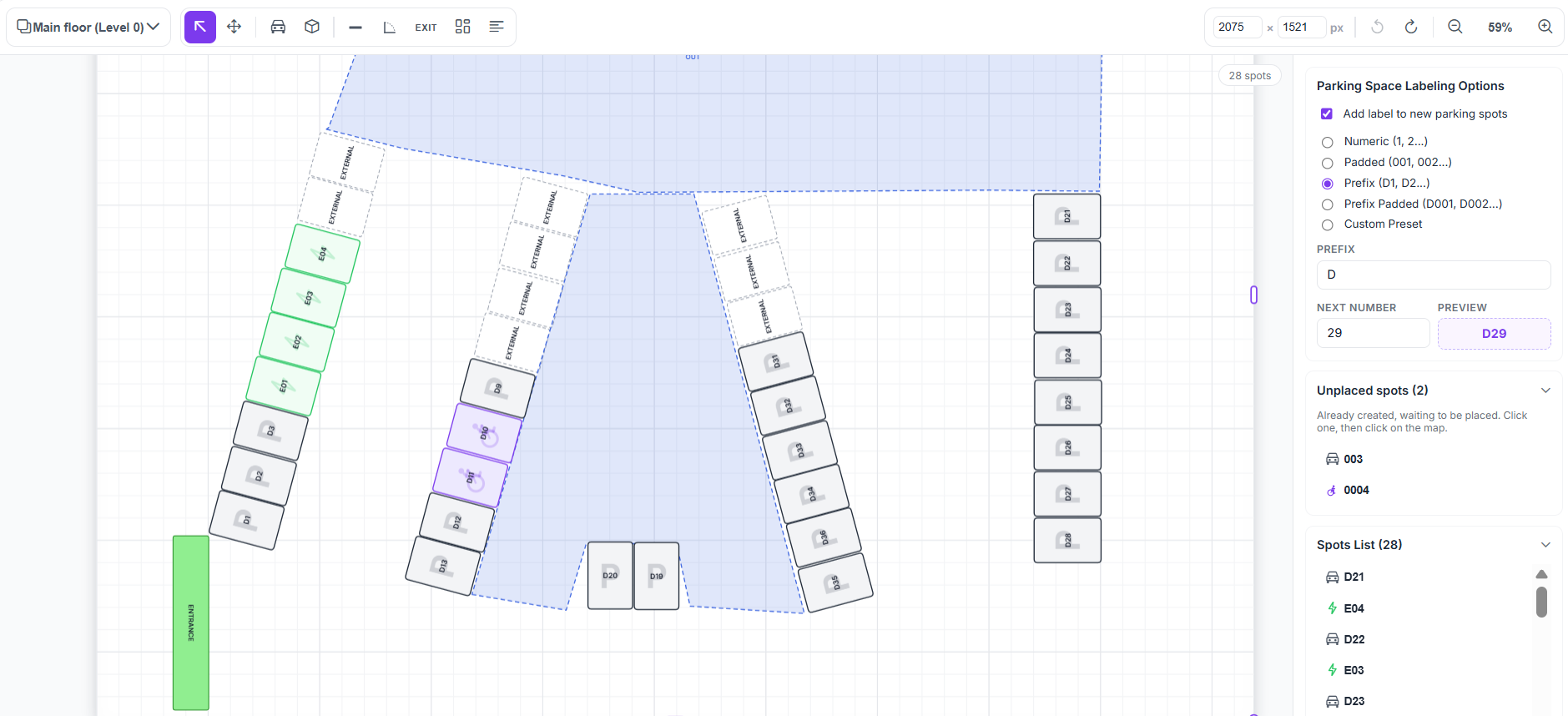
- A visual map editor: you draw each floor, place each space and mark the electric, accessible or outdoor ones.
- Issue reporting from the app: whoever spots a problem reports it, follows its status and chats with the admins.
- Web, iOS and Android, with the same interface for admins and employees.
The free plan allows up to 10 spaces and 15 users, so you can try the model in a small car park before rolling it out.
Frequently asked questions
How many parking spaces does a company with hybrid work need?
As many as you need on your busiest day, not as many as the total number of employees. As a calculation: people in the office on the peak day × share who come by car × 1.1 margin. For example, 160 people × 0.6 × 1.1 is about 105 spaces, compared with 120 if every person with a car had a fixed space.
Is it better to have fixed or shared spaces?
With hybrid work, shared, because a fixed space sits empty on the days its owner works from home. The most common and balanced approach is a mixed model: a few fixed spaces on clear criteria and the rest on daily booking.
How do you share parking spaces fairly between employees?
With public, written criteria for fixed spaces (reduced mobility, service vehicles, visitors) and daily booking with a booking window for the rest. Review the criteria every six months and make it visible who has booked what.
What should you do about booked spaces that end up unused?
Set the rule that bookings are cancelled as soon as people know they will not use them, and communicate it clearly. A space cancelled in time is available to someone else. Reviewing real occupancy each month tells you whether the problem is occasional or structural.
How do you manage spaces for visitors?
Reserve a few specific spaces for guests and clients, and manage their use under the same rules as the rest. That stops employees taking them and visitors arriving with nowhere to park.
When is it worth moving from a spreadsheet to parking management software?
When there are more people than spaces on peak days, or when someone has to referee every week who parks where. A spreadsheet does not send reminders, does not free spaces by itself and does not show everyone what is free at any moment.